Check your install
Three ways to confirm everything is in place: compare your folders with a working install, read the BepInEx log, or paste one PowerShell command that checks both. Click any screenshot to see it at full size.
Compare your folders
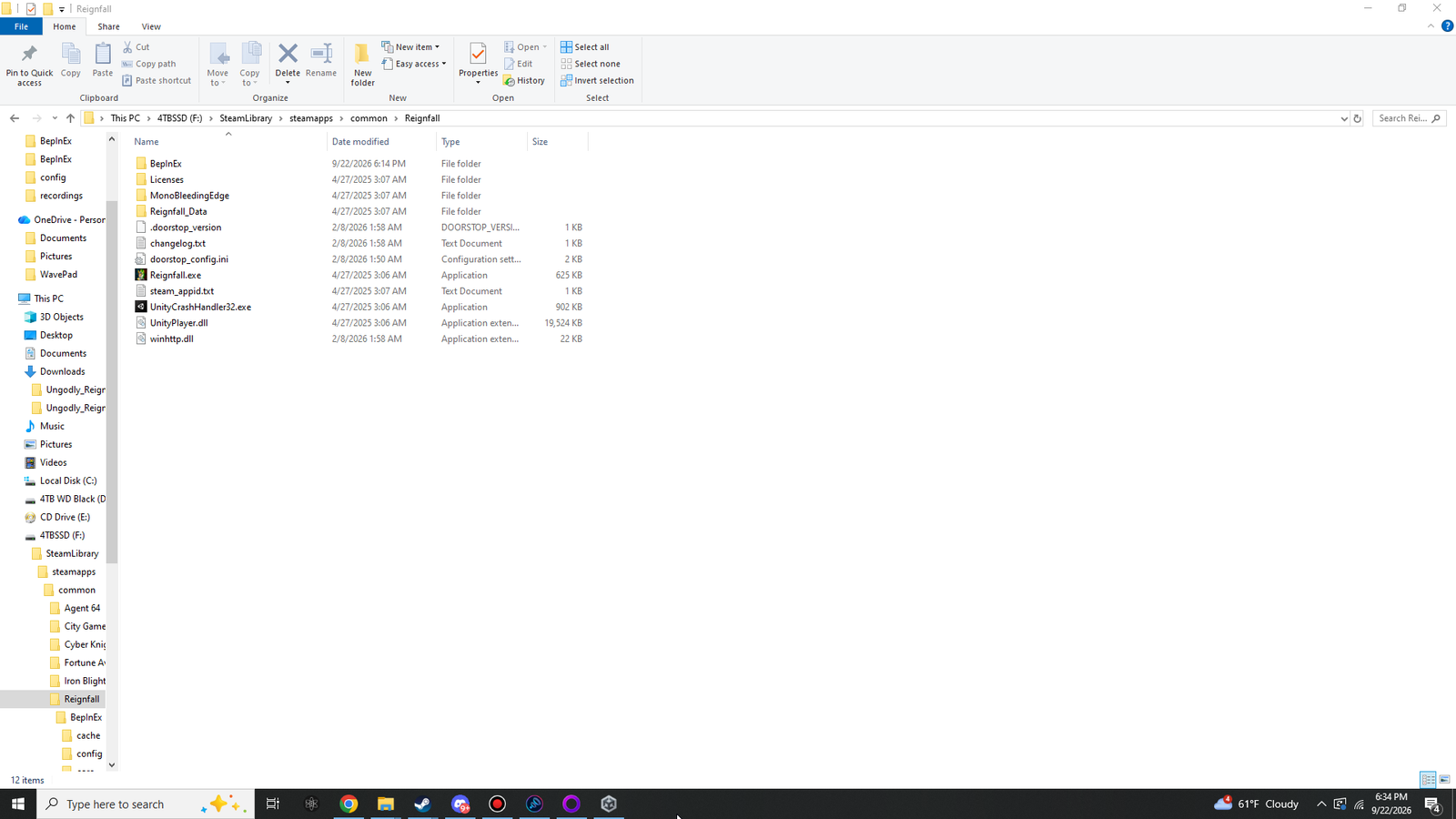
These screenshots come from a working install. Your drive letter and dates will differ; the names should match.
 (opens the original 1920 × 1080 screenshot)
BepInEx folder, .doorstop_version, changelog.txt, doorstop_config.ini and winhttp.dll, which shows as 22 KB because it is the x86 build.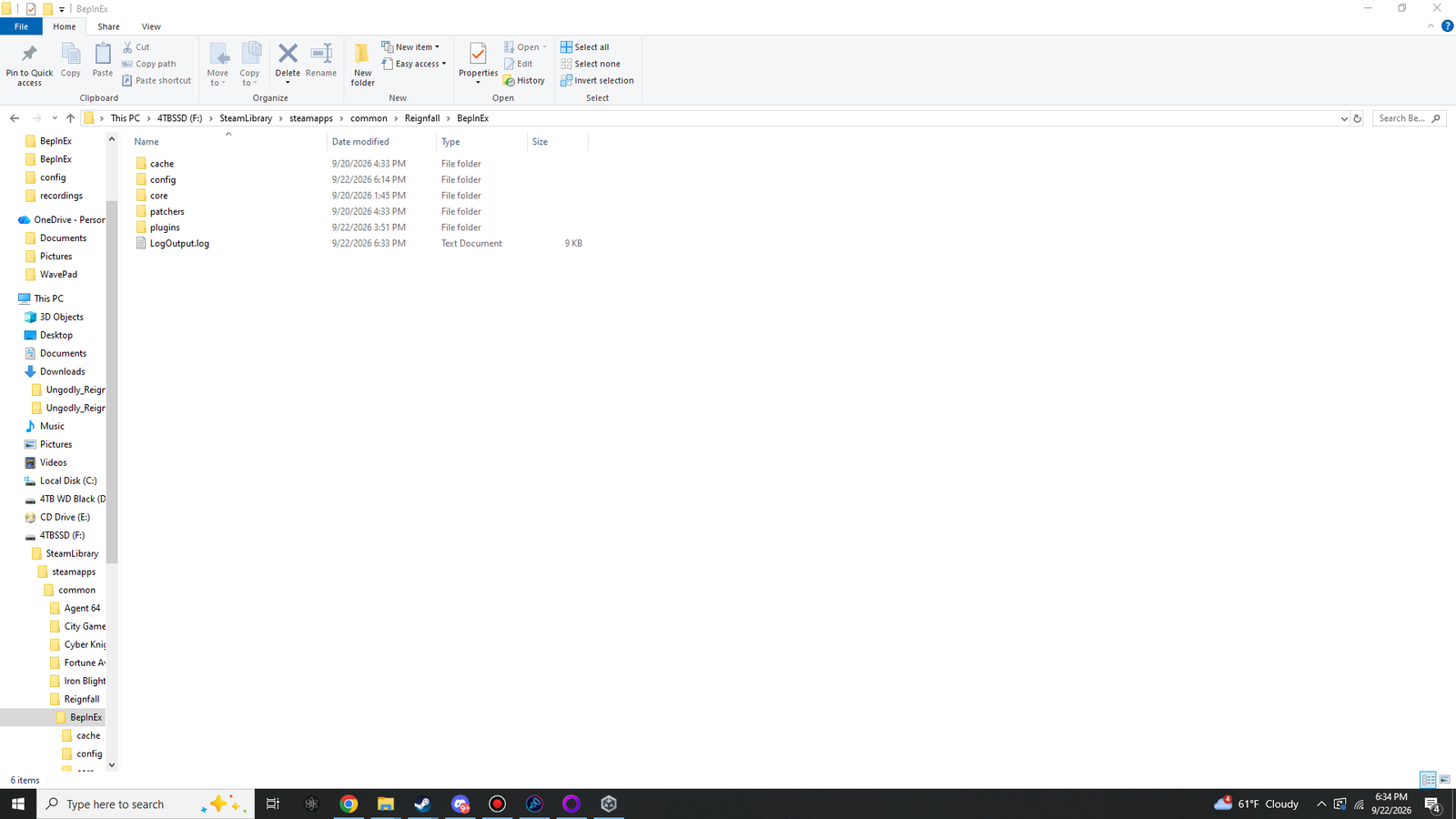 (opens the original 1920 × 1080 screenshot)
BepInEx after the first launch: cache, config, core, patchers, plugins and LogOutput.log.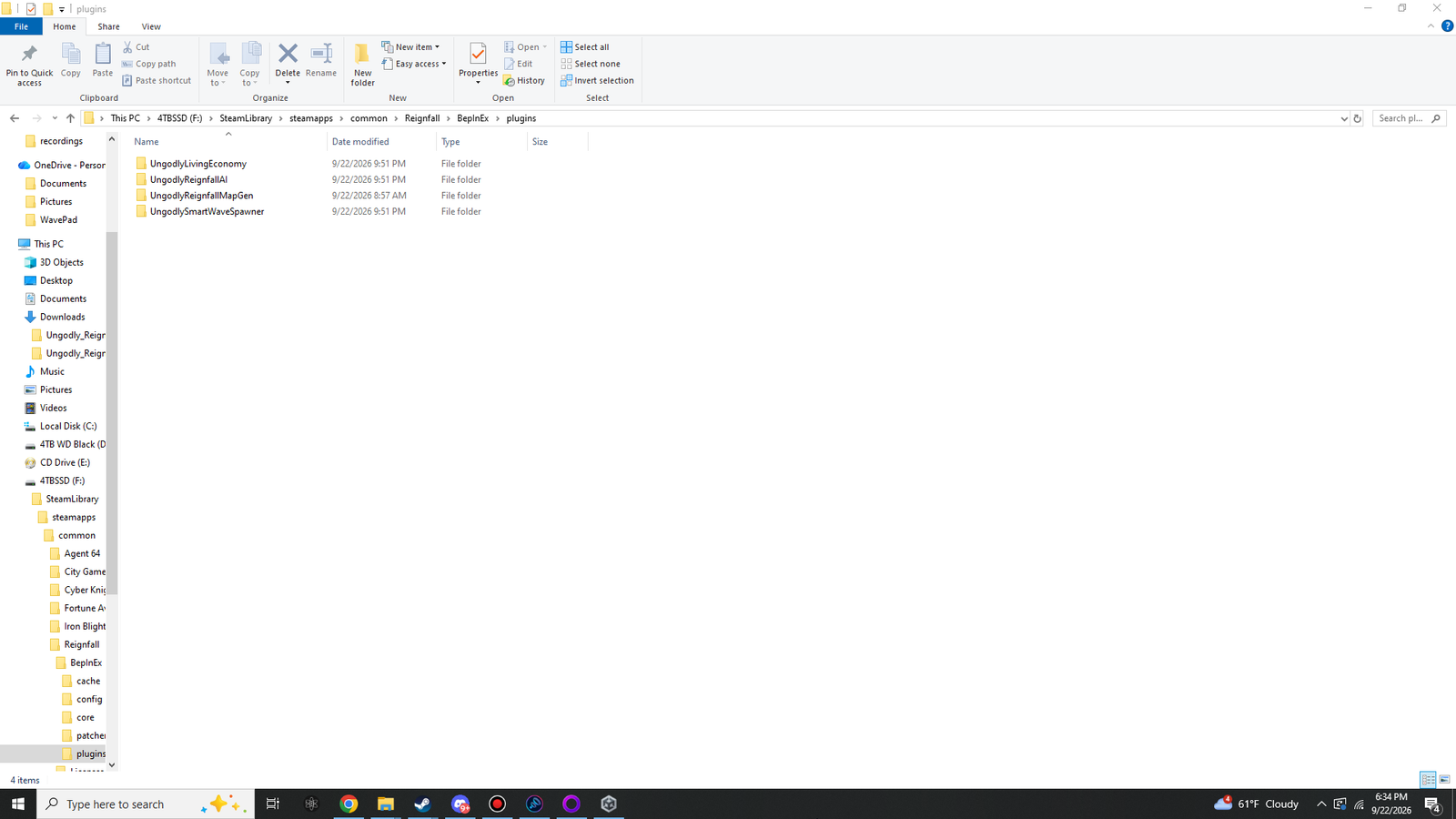 (opens the original 1920 × 1080 screenshot)
BepInEx\plugins with the four mod folders, each holding its own DLL.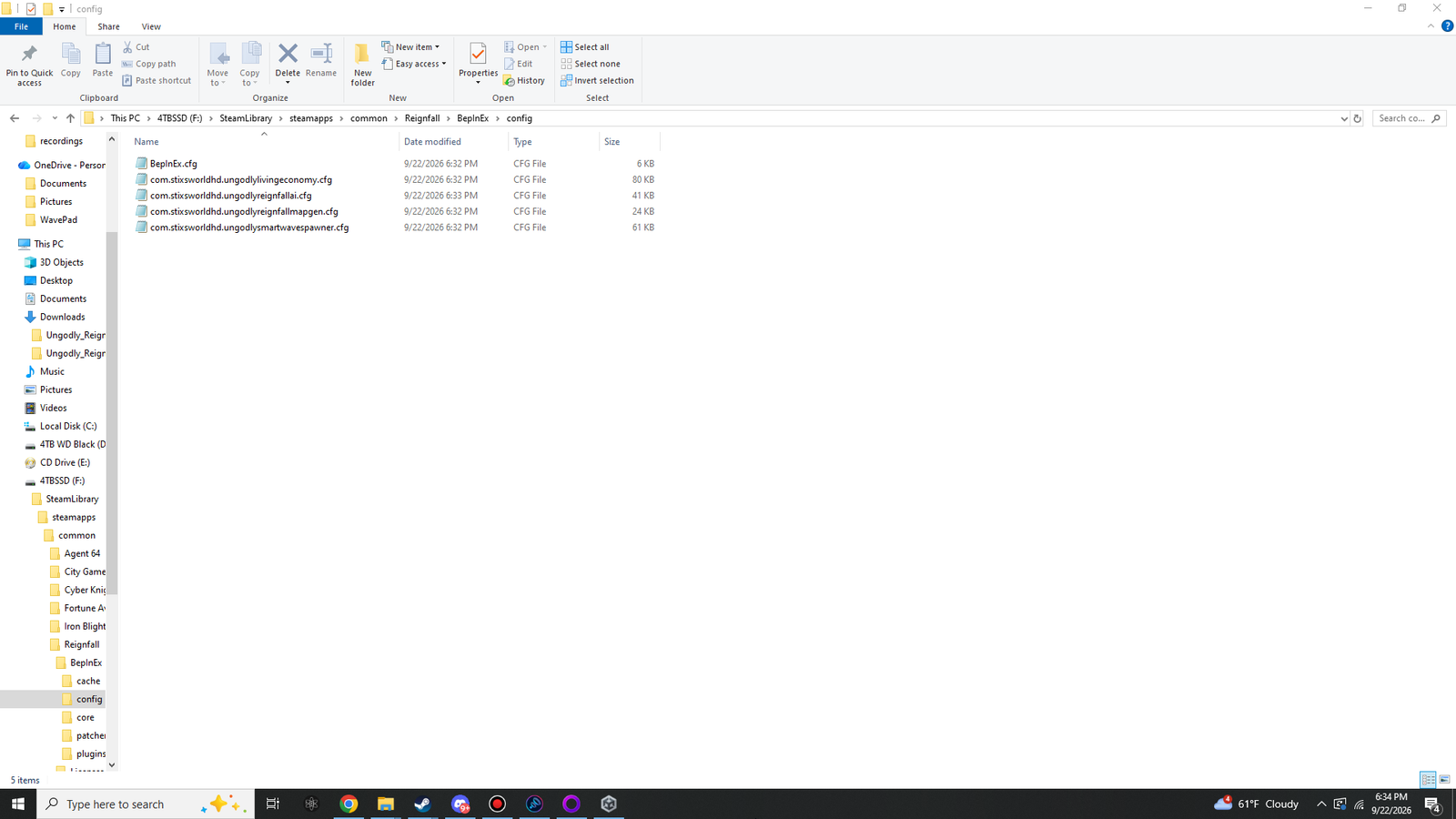 (opens the original 1920 × 1080 screenshot)
BepInEx\config after launching with the mods: BepInEx.cfg plus one settings file per mod, all created automatically.The whole install, as a tree:
- Reignfall
- BepInEx
- cache
- config
- BepInEx.cfg
- com.stixsworldhd.ungodlylivingeconomy.cfg
- com.stixsworldhd.ungodlyreignfallai.cfg
- com.stixsworldhd.ungodlyreignfallmapgen.cfg
- com.stixsworldhd.ungodlysmartwavespawner.cfg
- core18 files from the zip
- patchers
- plugins
- UngodlyLivingEconomy
- UngodlyLivingEconomy.dll
- UngodlyReignfallAI
- UngodlyReignfallAI.dll
- UngodlyReignfallMapGen
- UngodlyReignfallMapGen.dll
- UngodlySmartWaveSpawner
- UngodlySmartWaveSpawner.dll
- UngodlyLivingEconomy
- LogOutput.log
- Licenses
- MonoBleedingEdge
- Reignfall_Data
- .doorstop_version
- changelog.txt
- doorstop_config.ini
- Reignfall.exe
- steam_appid.txt
- UnityCrashHandler32.exe
- UnityPlayer.dll
- winhttp.dll22,016 bytes
- BepInEx
Read the BepInEx log
BepInEx rewrites its log every time the game starts, so launch Reignfall with the mods installed first. Then open this file in Notepad:
C:\Program Files (x86)\Steam\steamapps\common\Reignfall\BepInEx\LogOutput.logSearch (Ctrl + F) for each of these:
| Search for | What it tells you |
|---|---|
BepInEx 5.4.23.5 - Reignfall | BepInEx started inside Reignfall, and it is the right version. |
Loading [Ungodly Living Economy 1.1.1] | BepInEx found Ungodly Living Economy and loaded it. |
Loading [Ungodly Reignfall AI 1.0.4] | BepInEx found Ungodly Reignfall AI and loaded it. |
Loading [Ungodly Reignfall MapGen 1.0.0] | BepInEx found Ungodly Reignfall MapGen and loaded it. |
Loading [Ungodly Smart Wave Spawner 1.1.0] | BepInEx found Ungodly Smart Wave Spawner and loaded it. |
Chainloader startup complete | BepInEx finished loading plugins. |
In the file those lines look like this, with other lines between them. The four Loading lines can come in any order.
[Info   :   BepInEx] Loading [Ungodly Living Economy 1.1.1]
[Info   :   BepInEx] Loading [Ungodly Reignfall AI 1.0.4]
[Info   :   BepInEx] Loading [Ungodly Reignfall MapGen 1.0.0]
[Info   :   BepInEx] Loading [Ungodly Smart Wave Spawner 1.1.0]
[Message:   BepInEx] Chainloader startup complete
Each mod then reports its own start-up under its own name. The Wave Spawner, for example, writes Ungodly Smart Wave Spawner v1.1.0 by StixsworldHD (StixsmasterHD4k), and MapGen writes a line ending ready. Window key F6. after a [SelfTest] line that counts its patches.
These lines mean something needs fixing:
| If the log contains | See |
|---|---|
targets a wrong version of BepInEx | BepInEx is older than 5.4.23 |
Skipping [ | The mods do not load |
Error loading [ | A mod fails to load |
One-paste check with PowerShell
This checks the files, the BepInEx version, the four plugins, their settings files and the log, and prints each result as PASS, WARN, FAIL or INFO. It only reads; it changes nothing.
- Make sure the guide knows your Reignfall folder. The check below already uses it.
- Launch Reignfall once with the mods installed, so the log is current. The game can be running or closed.
- Open Windows PowerShell: Start menu, type PowerShell, press Enter.
- Click Copy on the check below, paste it into PowerShell (right-click or Ctrl + V) and press Enter. If Windows Terminal warns that the text has several lines, choose Paste anyway.
Paste it from Explorer’s address bar and every path on this site uses it. It is saved only in this browser.
& {
  # Ungodly Reignfall install check. It only reads files; it changes nothing.
  $Game = 'C:\Program Files (x86)\Steam\steamapps\common\Reignfall'
  $mods = @(
    @{ Name = 'Ungodly Reignfall MapGen'; Version = '1.0.0'; Folder = 'UngodlyReignfallMapGen'; Guid = 'com.stixsworldhd.ungodlyreignfallmapgen' },
    @{ Name = 'Ungodly Smart Wave Spawner'; Version = '1.1.0'; Folder = 'UngodlySmartWaveSpawner'; Guid = 'com.stixsworldhd.ungodlysmartwavespawner' },
    @{ Name = 'Ungodly Living Economy'; Version = '1.1.1'; Folder = 'UngodlyLivingEconomy'; Guid = 'com.stixsworldhd.ungodlylivingeconomy' },
    @{ Name = 'Ungodly Reignfall AI'; Version = '1.0.4'; Folder = 'UngodlyReignfallAI'; Guid = 'com.stixsworldhd.ungodlyreignfallai' }
  )
  $rows = New-Object System.Collections.Generic.List[object]
  function Add-Row([string]$State, [string]$Text) { $rows.Add([pscustomobject]@{ State = $State; Text = $Text }) }
  function GamePath([string[]]$Parts) { $p = $Game; foreach ($x in $Parts) { $p = Join-Path $p $x }; $p }

  Write-Host ''
  Write-Host "Checking: $Game" -ForegroundColor White
  if (-not (Test-Path -LiteralPath (GamePath @('Reignfall.exe')))) {
    Write-Host '[FAIL] Reignfall.exe is not in that folder. Set your Reignfall folder on the guide page, copy this check again and re-run it.' -ForegroundColor Red
    return
  }
  Add-Row 'PASS' 'Reignfall.exe found'

  $wh = GamePath @('winhttp.dll')
  if (Test-Path -LiteralPath $wh) {
    try {
      $b = [System.IO.File]::ReadAllBytes($wh)
      $pe = [BitConverter]::ToInt32($b, 60)
      $machine = [BitConverter]::ToUInt16($b, $pe + 4)
      if ($machine -eq 0x14c) { Add-Row 'PASS' ("winhttp.dll is the x86 (32-bit) build, {0} bytes" -f $b.Length) }
      elseif ($machine -eq 0x8664) { Add-Row 'FAIL' 'winhttp.dll is the x64 build. Reignfall needs BepInEx_win_x86: remove the five BepInEx items and extract the x86 zip.' }
      else { Add-Row 'FAIL' ("winhttp.dll has an unexpected machine type 0x{0:X}" -f $machine) }
    } catch { Add-Row 'FAIL' ("winhttp.dll could not be read: " + $_.Exception.Message) }
  } else { Add-Row 'FAIL' 'winhttp.dll is missing. It must sit next to Reignfall.exe.' }

  $ini = GamePath @('doorstop_config.ini')
  if (Test-Path -LiteralPath $ini) {
    if (Select-String -LiteralPath $ini -Pattern '^\s*enabled\s*=\s*true' -Quiet) { Add-Row 'PASS' 'doorstop_config.ini: enabled = true' }
    else { Add-Row 'FAIL' 'doorstop_config.ini: BepInEx is switched off. Set enabled = true.' }
  } else { Add-Row 'FAIL' 'doorstop_config.ini is missing. It must sit next to Reignfall.exe.' }

  $core = GamePath @('BepInEx', 'core', 'BepInEx.dll')
  if (Test-Path -LiteralPath $core) {
    try {
      $v = [System.Reflection.AssemblyName]::GetAssemblyName($core).Version
      if ($v.Major -eq 5 -and $v.Minor -eq 4 -and $v.Build -ge 23) { Add-Row 'PASS' "BepInEx $v" }
      elseif ($v.Major -eq 5) { Add-Row 'WARN' "BepInEx $v is older than 5.4.23. Extract 5.4.23.5 (x86) over it." }
      else { Add-Row 'FAIL' "BepInEx $v is not BepInEx 5. These mods need BepInEx 5.4.23.5 (x86)." }
    } catch { Add-Row 'FAIL' ("BepInEx.dll could not be read: " + $_.Exception.Message) }
  } else { Add-Row 'FAIL' 'BepInEx\core\BepInEx.dll is missing. Extract the whole BepInEx zip into the game folder.' }

  $plugins = GamePath @('BepInEx', 'plugins')
  $config = GamePath @('BepInEx', 'config')
  foreach ($d in @($plugins, $config)) {
    if (Test-Path -LiteralPath $d -PathType Container) { Add-Row 'PASS' "Folder exists: $d" }
    else { Add-Row 'FAIL' "Folder missing: $d (launch Reignfall once so BepInEx creates it)" }
  }

  foreach ($m in $mods) {
    $dll = "$($m.Folder).dll"
    $copies = @()
    if (Test-Path -LiteralPath $plugins) { $copies = @(Get-ChildItem -LiteralPath $plugins -Recurse -File -Filter $dll -ErrorAction SilentlyContinue) }
    if (Test-Path -LiteralPath (GamePath @('BepInEx', 'plugins', $m.Folder, $dll))) { Add-Row 'PASS' "$($m.Name): plugins\$($m.Folder)\$dll" }
    elseif ($copies.Count -gt 0) { Add-Row 'WARN' "$($m.Name): found at $($copies[0].FullName). It loads, but the guide keeps it in plugins\$($m.Folder)." }
    else { Add-Row 'FAIL' "$($m.Name): $dll is not anywhere in BepInEx\plugins" }
    if ($copies.Count -gt 1) { Add-Row 'WARN' "$($m.Name): $($copies.Count) copies of $dll in plugins. Keep one." }
  }

  foreach ($m in $mods) {
    $cfg = "$($m.Guid).cfg"
    if (Test-Path -LiteralPath (GamePath @('BepInEx', 'config', $cfg))) { Add-Row 'PASS' "Settings file: $cfg" }
    else { Add-Row 'INFO' "Settings file not created yet: $cfg (it appears after a launch with the mod installed)" }
  }

  $log = GamePath @('BepInEx', 'LogOutput.log')
  if (Test-Path -LiteralPath $log) {
    $text = ''
    try {
      $fs = New-Object System.IO.FileStream($log, [System.IO.FileMode]::Open, [System.IO.FileAccess]::Read, [System.IO.FileShare]::ReadWrite)
      $sr = New-Object System.IO.StreamReader($fs)
      $text = $sr.ReadToEnd()
      $sr.Close()
    } catch { Add-Row 'FAIL' ("LogOutput.log could not be read: " + $_.Exception.Message) }
    Add-Row 'INFO' ("LogOutput.log was last written " + (Get-Item -LiteralPath $log).LastWriteTime)
    if ($text -match 'BepInEx (5\.\d+\.\d+\.\d+) - Reignfall') { Add-Row 'PASS' ("Log: BepInEx " + $Matches[1] + " started inside Reignfall") }
    else { Add-Row 'WARN' 'Log: no "BepInEx 5.x.x.x - Reignfall" line' }
    foreach ($m in $mods) {
      $line = "Loading [$($m.Name) $($m.Version)]"
      if ($text.Contains($line)) { Add-Row 'PASS' "Log: $line" } else { Add-Row 'FAIL' "Log: no $line line" }
    }
    if ($text.Contains('Chainloader startup complete')) { Add-Row 'PASS' 'Log: Chainloader startup complete' }
    else { Add-Row 'WARN' 'Log: "Chainloader startup complete" not found. Was the game closed before it finished loading?' }
    $problems = @($text -split "`r?`n" | Where-Object { $_ -match 'targets a wrong version of BepInEx|Error loading \[|Skipping \[' })
    foreach ($p in ($problems | Select-Object -First 8)) { Add-Row 'WARN' ("Log: " + $p.Trim()) }
  } else { Add-Row 'FAIL' 'BepInEx\LogOutput.log is missing, so BepInEx has not run. Launch Reignfall once.' }

  $colors = @{ PASS = 'Green'; WARN = 'Yellow'; FAIL = 'Red'; INFO = 'Cyan' }
  foreach ($r in $rows) { Write-Host ("[{0}] {1}" -f $r.State, $r.Text) -ForegroundColor $colors[$r.State] }
  $fails = @($rows | Where-Object { $_.State -eq 'FAIL' }).Count
  $warns = @($rows | Where-Object { $_.State -eq 'WARN' }).Count
  Write-Host ''
  if ($fails -eq 0 -and $warns -eq 0) { Write-Host 'Everything checks out.' -ForegroundColor Green }
  else { Write-Host ("{0} problem(s), {1} warning(s). The Troubleshooting page covers each one." -f $fails, $warns) -ForegroundColor Yellow }
}
The last line reads Everything checks out. when all is well. Each FAIL or WARN names the problem, and Troubleshooting covers every one.